


Tank 4 Pro - Smartphone robusto 5G con Pantalla AMOLED y proyector DLP
Certificado por



Elegir opciones
Certificado por
Certificado por
Precisión, durabilidad y velocidad: Tank 4 Pro lo tiene todo

El rey del rendimiento resistente
Tank 4 Pro está impulsado por el chipset MediaTek Dimensity 8300 5G, construido en un proceso de 4nm para maximizar la eficiencia y la duración de la batería. Con una CPU de ocho núcleos y una GPU de alto rendimiento, ofrece juegos fluidos, inicio rápido de aplicaciones y multitarea receptiva para flujos de trabajo exigentes.

Proyecta en cualquier momento y lugar
Tank 4 Pro incorpora enfoque automático rápido y corrección trapezoidal para una visualización en pantalla grande sin esfuerzo. Proyecta imágenes de calidad cinematográfica de hasta 120 pulgadas. Con hasta 4,5 horas de proyección continua, es ideal para películas, presentaciones y juegos en movimiento.

Pantalla AMOLED de 6,73" y frecuencia de actualización de 120Hz
Tank 4 Pro cuenta con una pantalla AMOLED de 6,73 pulgadas con una resolución de 3200 × 1440, que ofrece colores vibrantes y detalles nítidos para contenido en alta definición. Con una frecuencia de actualización de 120Hz, mantiene el desplazamiento, las animaciones y el juego fluidos y receptivos para una mejor experiencia de visualización.

Almacenamiento masivo listo para todo
Tank 4 Pro combina 16GB de RAM con 512GB de almacenamiento para una multitarea fluida y espacio de sobra para fotos, videos, películas y archivos, además de una ranura microSD para que puedas ampliar el almacenamiento en cualquier momento a medida que crece tu biblioteca.

Sistema de cámara mejorado
El Tank 4 Pro cuenta con un sistema de triple cámara trasera liderado por una cámara principal de 50MP AF con sensor Samsung S5KGN1SP de 1/1.3 pulgadas, además de una cámara de visión nocturna de 64MP y un teleobjetivo de 50MP para capturas versátiles en exteriores. En la parte frontal, una cámara selfie de 32MP ofrece selfies nítidas.

Batería grande de 11600mAh + carga rápida de 66W
Con una enorme batería de 11600mAh, el Tank 4 Pro es ideal para usuarios intensivos y entusiastas de las actividades al aire libre. Con carga rápida de 66W, puedes recargar rápidamente y minimizar el tiempo de inactividad.

* Todas las afirmaciones sobre la batería dependen de la red celular, ubicación, intensidad de la señal, configuración de funciones, uso y muchos otros factores; los resultados reales pueden variar.
Diseñado para exteriores: resistente pero portátil
Con certificaciones IP68 e IP69K para resistencia al polvo y al agua, el Tank 4 Pro está hecho para soportar la lluvia, la arena y entornos exigentes. Con un peso de 530g, logra un equilibrio entre protección robusta y portabilidad diaria.

Conectividad del teléfono a la pantalla: Amplía tu vista
Conecta el Tank 4 Pro a una pantalla más grande y disfruta de una vista más amplia para juegos, streaming, estudio y presentaciones. Una conexión por cable estable garantiza imágenes fluidas con un retraso mínimo.

Kit de herramientas multiusos
Tank 4 Pro viene con un conjunto integrado de herramientas prácticas y profesionales para uso exterior e industrial. Ofrece una solución todo en uno para el trabajo, la exploración y emergencias.

Especificaciones de Unihertz Tank 4 Pro
Información básica
Dimensiones: 174.9 × 87 × 22.5 mmPeso: 530g (Con batería)
CPU: Dimensity 8300 (5G) Octa-Core 2.2-3.2GHz
OS: Android 15
Memoria: 16/18GB LPDDR5X + 512GB/1TB UFS 4.0
Batería: No extraíble 11600 mAh
Velocidad de carga: 120W
Tipo de tarjeta SIM: Doble tarjeta Nano SIM
Micro SD: Sí
Ranura para tarjetas: Dual SIMs + Micro SD
Pantalla
Material: AMOLEDTamaño de pantalla: 6.73 pulgadas (Frecuencia de actualización: 120hz)
Resolución: 1440 × 3200 Pixeles
Cámara
Cámara trasera: Cámara principal de 50MP + Cámara de visión nocturna de 64MP + Teleobjetivo de 50MPCámara frontal: 32MP
Conectividad
Bandas: 2G GSM: Bands 2/3/5/8, 3G WCDMA: Bands 1/2/4/5/6/8/19, 3G CDMA2000: Bands BC0/BC1, 4G FDD-LTE: Bands 1/2/3/4/5/7/8/12/13/17/18/19/20/25/26/28A/28B/66, 4G TDD-LTE: Bands 34/38/39/40/41/42/48, 5G NR: Bands N1/2/3/5/7/8/20/25/26/28/38/40/41/48/66/77/78, 5G NR (4×4 MIMO): Bands N1/3/38/41/48/77/78Wi-Fi: WLAN 802.11 a/b/g/n/ac/ax 2.4GHz/5GHz, 2×2 MIMO, Wi-Fi Direct, Pantalla Wi-Fi, Wi-Fi Hotspot , MU-MIMO
Bluetooth: Bluetooth 5.4
NFC: Sí
Navegación: GPS + GLONASS + BEIDOU + Galileo
Características
Sensores: Fingerprint, G-Sensor, Gyroscope, Proximity, Ambient Light Sensor, Compass, BaroceptorFingerprint: Sí
Reconocimiento facial: Sí
Puerto infrarrojo: Sí
USB: USB Type C (USB 3.2 Gen1 + DP 1.4)
USB OTG: Sí
Tecla programable: Sí
Altavoz: Sí
Conector de auriculares de 3.5mm: Sí
Carga inalámbrica: No
Radio FM: Sí
Varios
Color: BlackResistente a salpicaduras, agua y polvo: IP68 Water / Dust Resistant
Resistente a golpes: Sí
Luz para camping: Sí
Brillo de la luz para camping: Máx. 1200 lm / Luz de advertencia roja | azul
Proyección: Sí
Valor SAR: SAR (EU 10g): Head 0.396 W/kg, Body 0.965 W/kg; SAR (US 1g): Head 0.769 W/kg, Body 1.025 W/kg
Certificaciones
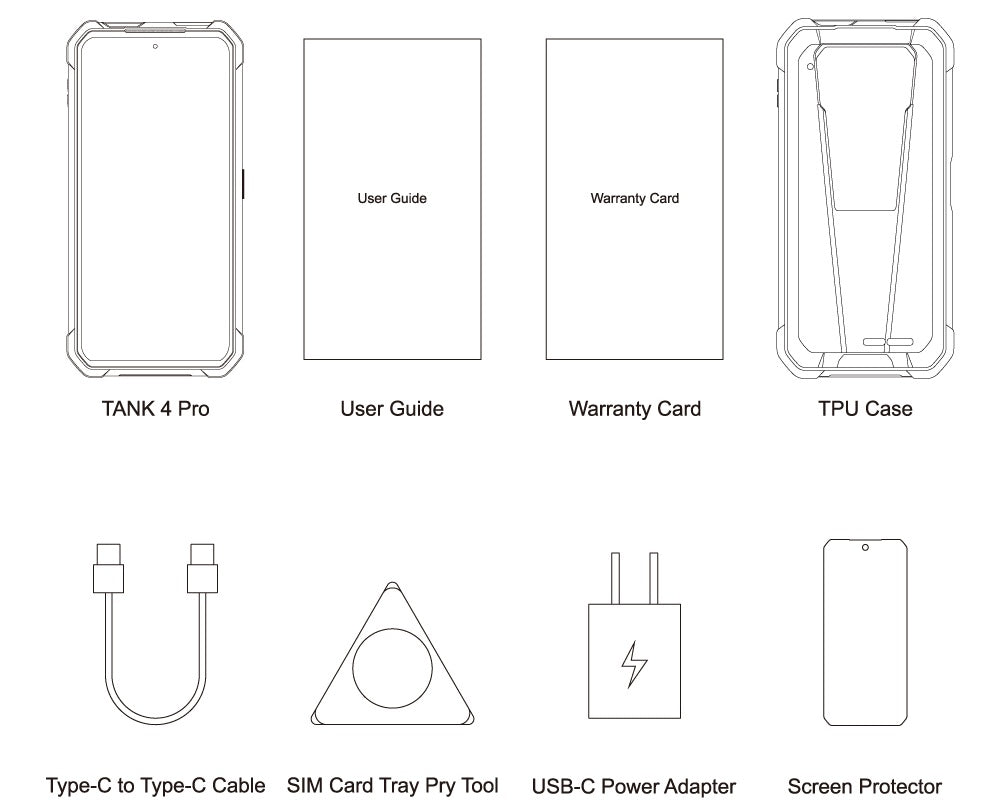
Contenido de la caja
GENERAL QUESTIONS
1. Go to Settings ->System ->About Phone ->IMEI number 1 and 2.
2. Look for the IMEIs on the box of the phone (if you still have it).
Settings ->System ->About phone ->Wireless update
Please follow these steps to clear cache before searching for the update again:
Settings -> App Notifications ->See all apps ->Show System (top right corner with 3 dots) ->Wireless update-> Clear Data and Cache
Reset to Factory Settings (When your phone can be turned on)
Settings ->System ->Reset Options ->Erase all data (factory reset)
Reset to Factory Settings (When your phone cannot be turned on)
Power off your phone -> Press and hold the Power and Volume up buttons -> After your phone vibrates, keep holding the buttons for 5 seconds to enter Recovery mode -> Press the Volume up and down buttons to select the option to clear data or restore your device to its factory settings -> then press the Power button to confirm -> Reboot your phone.
If you have forgotten your phone password and want to unlock it, you will have to restore your device to its factory settings. Then you can set it up again and set a new screen lock.
However, all data on your phone will be erased and cannot be restored. It is recommended that you confirm whether you have backed up your phone data on the cloud or by other means. It is also recommended that you confirm whether you or someone else has changed the PIN/password. If you still cannot recall the password, refer to last Question to restore your device.
English, English(UK), German, French, Italian, Portuguese, Spanish, Russian, Dutch, Japanese, Simplified Chinese, Traditional Chinese(Zhuyin, Cangjie, Quick input).
For the keyboard input of other languages, we may consider adding them in the future if we receive enough demands.
On the other hand, Android system supports a wide range of languages, with which you will be able to turn on touch screen input as a supplement.
TELECOM COMPATIBILITY
1. Check the feedback from other users here.
2. Please find the the phone's supported bands in product specs and check if those meet your sim-card carrier's needs or contact your carrier.
* Due to different carrier's policy regarding to unlocked phones, LTE wireless service may not be available even if listed bands are supported by your carrier. When this happens, please contact your carrier for more details.
Our phone can work fine in Verizon network. However, as it is not certified by Verizon, you cannot activate your new SIM card with it. Please activate the new SIM card with another Verizon certified device and then use it in your Unihertz phone.
TECHNICAL ISSUES (PROBLEM SHOOTING)
Please follow the guide to do a micro-calibration for your phone (you can also contact us for a video guide):
1. Please clear the dust in your proximity censor hole on top of your phone.
2. Input *#3377# in the Dial-up interface.
3. Click Distance calibration.
4. Follow the guide to finish the process.
Please permit the apps to run in the background by activating them in the following three settings:
1. Settings ->DuraSpeed
2. Settings ->Intelligent assitance ->App blocker
3. Settings ->App¬ification ->See all apps ->this app ->Battery ->Battery optimization and Background restriction->Don't optimize
You can also watch a video guide here.
It is not advised to downgrade your smartphone since there might be compatibility issues.
Please contact your operator and check the APN parameters.
1. Go to Sound Recorder app and run a recording test.
2. Check whether your SIM card works well on the other phone.
1. Please check if this only happened to some or all of friends you called.
2. Stay in the same location and insert your SIM card into another Android phone and the same issue arises.
3. Turn on call record in the call interface to record a call, then check whether the sound recorded is normal.
1. Please send us a full screenshot of your battery usage in Settings ->battery ->battery usage.
2. Follow these steps to capture the battery log and send it to service@unihertz.com for further analysis.
REPAIR AND WARRANTY
For repair, please send without the accessories.
For replacement or refund, please send with accessories in one package.
The broken glass is not covered by warranty.
Please send the smartphone back to us after negotiating with service@unihertz.com as we do not provide phone screen separately. Repair or replacement fee may apply.
The repaired/ replaced device will get extra 90 days warranty or the remaining original warranty period, whichever is longer.