


Tank 4 Pro - Smartphone rugged 5G con Display AMOLED e proiettore DLP
Certificato da



Scegli le opzioni
Certificato da
Certificato da
Precisione, resistenza e velocità: Tank 4 Pro offre tutto questo

Il re delle prestazioni rugged
Tank 4 Pro è alimentato dal chipset MediaTek Dimensity 8300 5G, costruito con processo a 4nm per massimizzare efficienza e durata della batteria. Con una CPU octa-core e una GPU ad alte prestazioni, offre gameplay fluido, avvio rapido delle app e multitasking reattivo anche per i flussi di lavoro più impegnativi.

Proietta ovunque e in qualsiasi momento
Tank 4 Pro offre autofocus rapido e correzione trapezoidale per una visione su grande schermo senza sforzo. Proietta immagini di qualità cinematografica fino a 120 pollici. Con fino a 4,5 ore di proiezione continua, è ideale per film, presentazioni e gaming ovunque tu sia.

Display AMOLED da 6,73" & Refresh Rate 120Hz
Tank 4 Pro vanta un Display AMOLED da 6,73 pollici con risoluzione 3200 × 1440, offrendo colori vivaci e dettagli nitidi per contenuti in alta definizione. Con un refresh rate di 120Hz, garantisce scorrimento, animazioni e gameplay fluidi e reattivi per una migliore esperienza visiva complessiva.

Spazio di archiviazione enorme, pronto a tutto
Tank 4 Pro combina 16GB di RAM con 512GB di memoria per un multitasking fluido e tanto spazio per foto, video, film e file, oltre a uno slot microSD per espandere la memoria in qualsiasi momento man mano che la tua libreria cresce.

Sistema fotografico migliorato
Tank 4 Pro è dotato di un sistema a tripla fotocamera posteriore guidato da una fotocamera principale AF da 50MP con sensore Samsung S5KGN1SP da 1/1.3 pollici, oltre a una fotocamera per visione notturna da 64MP e un teleobiettivo da 50MP per scatti versatili in ambienti esterni. Davanti, una fotocamera selfie da 32MP garantisce selfie nitidi.

Batteria grande da 11600mAh + ricarica rapida da 66W
Con una batteria enorme da 11600mAh, Tank 4 Pro è ideale per utenti intensivi e appassionati di attività all'aperto. Grazie alla ricarica rapida da 66W, puoi ricaricare velocemente e ridurre al minimo i tempi di inattività.

* Tutte le dichiarazioni sulla batteria dipendono dalla rete cellulare, dalla posizione, dalla potenza del segnale, dalla configurazione delle funzioni, dall'utilizzo e da molti altri fattori; i risultati effettivi possono variare.
Progettato per l'outdoor: resistente ma portatile
Con certificazioni IP68 e IP69K per la resistenza a polvere e acqua, Tank 4 Pro è costruito per affrontare pioggia, sabbia e ambienti difficili. Con un peso di 530g, offre il giusto equilibrio tra protezione robusta e portabilità quotidiana.

Connessione telefono-schermo: amplia la tua visuale
Collega Tank 4 Pro a uno schermo più grande e goditi una visuale più ampia per giochi, streaming, studio e presentazioni. Una connessione cablata stabile garantisce immagini fluide con ritardi minimi.

Kit multiuso
Tank 4 Pro è dotato di una suite integrata di strumenti pratici e professionali per l'uso all'aperto e industriale. Offre una soluzione tutto-in-uno per lavoro, esplorazione ed emergenze.

Unihertz Tank 4 Pro Specifiche
Informazioni di base
Dimensioni: 174.9 × 87 × 22.5 mmPeso: 530g (Con batteria)
CPU: Dimensity 8300 (5G) Octa-Core 2.2-3.2GHz
Sistema operativo: Android 15
Memoria: 16/18GB LPDDR5X + 512GB/1TB UFS 4.0
Batteria: Non rimovibile 11600 mAh
Velocità di carica: 120W
Tipo di scheda SIM: Doppia scheda Nano SIM
Micro SD: Sì
Slot per schede: Doppie SIM + Micro SD
Display
Materiale: AMOLEDDimensioni del Display: 6.73 inches (Refresh Rate: 120hz)
Risoluzione: 1440 × 3200 Pixel
Fotocamera
Fotocamera posteriore: Fotocamera principale da 50MP + Fotocamera notturna da 64MP + Teleobiettivo da 50MPFotocamera anteriore: 32MP
Connettività
Bande: 2G GSM: Bande 2/3/5/8, 3G WCDMA: Bande 1/2/4/5/6/8/19, 3G CDMA2000: Bande BC0/BC1, 4G FDD-LTE: Bande 1/2/3/4/5/7/8/12/13/17/18/19/20/25/26/28A/28B/66, 4G TDD-LTE: Bande 34/38/39/40/41/42/48, 5G NR: Bande N1/2/3/5/7/8/20/25/26/28/38/40/41/48/66/77/78, 5G NR (4×4 MIMO): Bande N1/3/38/41/48/77/78Wi-Fi: WLAN 802.11 a/b/g/n/ac/ax 2.4GHz/5GHz, 2×2 MIMO, Wi-Fi Direct, Wi-Fi Display, Wi-Fi Hotspot , MU-MIMO
Bluetooth: Bluetooth 5.4
NFC: Sì
Navigazione: GPS + GLONASS + BEIDOU + Galileo
Funzionalità
Sensori: Impronta digitale, G-Sensor, Giroscopio, Prossimità, Sensore di luce ambientale, Bussola, BarocettoreImpronta digitale: Sì
Riconoscimento facciale: Sì
Porta a infrarossi: Sì
USB: USB Type C (USB 3.2 Gen1 + DP 1.4)
USB OTG: Sì
Tasto programmabile: Sì
Altoparlante: Sì
Jack per cuffie da 3.5mm: Sì
Ricarica wireless: No
Radio FM: Sì
Varie
Colore: NeroResistente a spruzzi, acqua e polvere: Resistente ad acqua / polvere IP68
Resistente agli urti: Sì
Luce da campeggio: Sì
Luminosità della luce da campeggio: Max. 1200 lm / Luce di avviso rossa | blu
Proiezione: Sì
Valore SAR: SAR (EU 10g): Testa 0.396 W/kg, Corpo 0.965 W/kg; SAR (US 1g): Testa 0.769 W/kg, Corpo 1.025 W/kg
Certificazioni
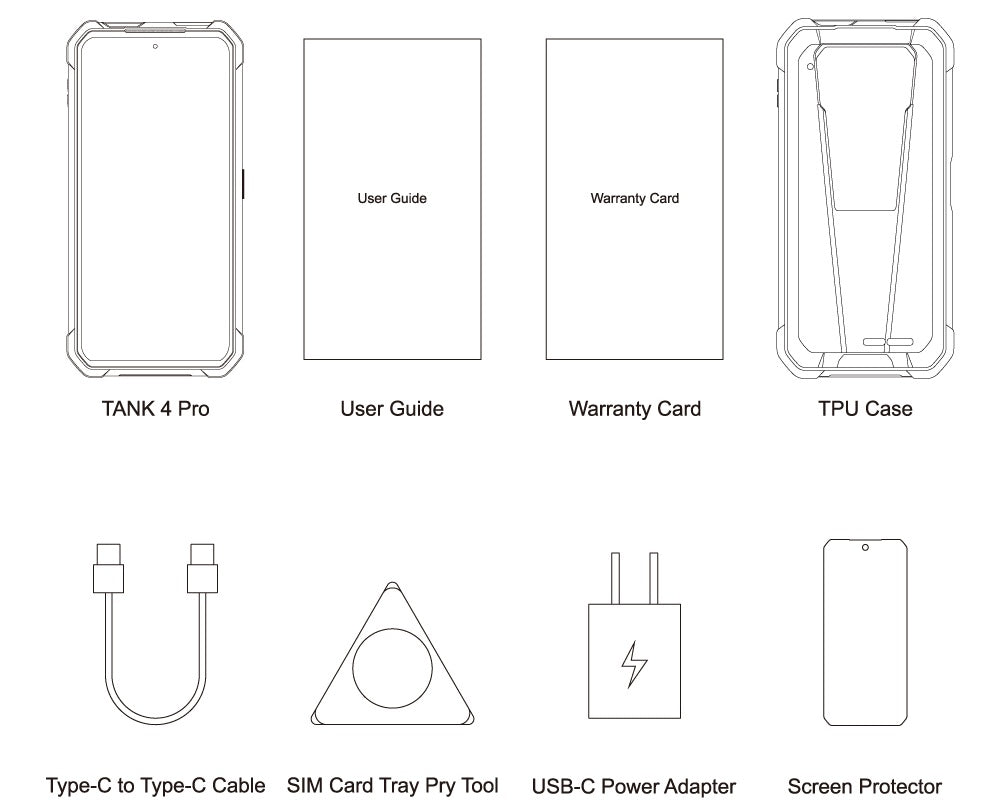
Contenuto della confezione
GENERAL QUESTIONS
1. Go to Settings ->System ->About Phone ->IMEI number 1 and 2.
2. Look for the IMEIs on the box of the phone (if you still have it).
Settings ->System ->About phone ->Wireless update
Please follow these steps to clear cache before searching for the update again:
Settings -> App Notifications ->See all apps ->Show System (top right corner with 3 dots) ->Wireless update-> Clear Data and Cache
Reset to Factory Settings (When your phone can be turned on)
Settings ->System ->Reset Options ->Erase all data (factory reset)
Reset to Factory Settings (When your phone cannot be turned on)
Power off your phone -> Press and hold the Power and Volume up buttons -> After your phone vibrates, keep holding the buttons for 5 seconds to enter Recovery mode -> Press the Volume up and down buttons to select the option to clear data or restore your device to its factory settings -> then press the Power button to confirm -> Reboot your phone.
If you have forgotten your phone password and want to unlock it, you will have to restore your device to its factory settings. Then you can set it up again and set a new screen lock.
However, all data on your phone will be erased and cannot be restored. It is recommended that you confirm whether you have backed up your phone data on the cloud or by other means. It is also recommended that you confirm whether you or someone else has changed the PIN/password. If you still cannot recall the password, refer to last Question to restore your device.
English, English(UK), German, French, Italian, Portuguese, Spanish, Russian, Dutch, Japanese, Simplified Chinese, Traditional Chinese(Zhuyin, Cangjie, Quick input).
For the keyboard input of other languages, we may consider adding them in the future if we receive enough demands.
On the other hand, Android system supports a wide range of languages, with which you will be able to turn on touch screen input as a supplement.
TELECOM COMPATIBILITY
1. Check the feedback from other users here.
2. Please find the the phone's supported bands in product specs and check if those meet your sim-card carrier's needs or contact your carrier.
* Due to different carrier's policy regarding to unlocked phones, LTE wireless service may not be available even if listed bands are supported by your carrier. When this happens, please contact your carrier for more details.
Our phone can work fine in Verizon network. However, as it is not certified by Verizon, you cannot activate your new SIM card with it. Please activate the new SIM card with another Verizon certified device and then use it in your Unihertz phone.
TECHNICAL ISSUES (PROBLEM SHOOTING)
Please follow the guide to do a micro-calibration for your phone (you can also contact us for a video guide):
1. Please clear the dust in your proximity censor hole on top of your phone.
2. Input *#3377# in the Dial-up interface.
3. Click Distance calibration.
4. Follow the guide to finish the process.
Please permit the apps to run in the background by activating them in the following three settings:
1. Settings ->DuraSpeed
2. Settings ->Intelligent assitance ->App blocker
3. Settings ->App¬ification ->See all apps ->this app ->Battery ->Battery optimization and Background restriction->Don't optimize
You can also watch a video guide here.
It is not advised to downgrade your smartphone since there might be compatibility issues.
Please contact your operator and check the APN parameters.
1. Go to Sound Recorder app and run a recording test.
2. Check whether your SIM card works well on the other phone.
1. Please check if this only happened to some or all of friends you called.
2. Stay in the same location and insert your SIM card into another Android phone and the same issue arises.
3. Turn on call record in the call interface to record a call, then check whether the sound recorded is normal.
1. Please send us a full screenshot of your battery usage in Settings ->battery ->battery usage.
2. Follow these steps to capture the battery log and send it to service@unihertz.com for further analysis.
REPAIR AND WARRANTY
For repair, please send without the accessories.
For replacement or refund, please send with accessories in one package.
The broken glass is not covered by warranty.
Please send the smartphone back to us after negotiating with service@unihertz.com as we do not provide phone screen separately. Repair or replacement fee may apply.
The repaired/ replaced device will get extra 90 days warranty or the remaining original warranty period, whichever is longer.