


Tank 4 Pro - Smartphone 5G durci avec Écran AMOLED et projecteur DLP
Certifié par



Configurer
Certifié par
Certifié par
Précision, durabilité et rapidité – le Tank 4 Pro offre tout cela

Le roi de la performance robuste
Le Tank 4 Pro est propulsé par le chipset MediaTek Dimensity 8300 5G, conçu en 4 nm pour maximiser l’efficacité et l’autonomie. Avec un processeur octa-core et un GPU haute performance, il offre un gameplay fluide, des lancements d’applications rapides et un multitâche réactif pour les tâches les plus exigeantes.

Projetez à tout moment, n’importe où
Le Tank 4 Pro dispose d’une mise au point automatique rapide et d’une correction de trapèze pour une visualisation grand écran sans effort. Il projette des images de qualité cinéma jusqu’à 120 pouces. Avec jusqu’à 4,5 heures de projection continue, il est idéal pour les films, les présentations et le jeu en déplacement.

Écran AMOLED 6,73" & Taux de rafraîchissement 120Hz
Le Tank 4 Pro est doté d’un écran AMOLED de 6,73 pouces avec une résolution de 3200 × 1440, offrant des couleurs éclatantes et des détails nets pour un contenu haute définition. Avec un taux de rafraîchissement de 120Hz, il garantit un défilement, des animations et un gameplay fluides et réactifs pour une expérience visuelle optimale.

Stockage massif prêt à tout
Le Tank 4 Pro associe 16 Go de RAM à 512 Go de stockage pour un multitâche fluide et beaucoup d’espace pour vos photos, vidéos, films et fichiers, avec en plus un emplacement microSD pour étendre le stockage à tout moment au fur et à mesure que votre bibliothèque grandit.

Système de caméra amélioré
Le Tank 4 Pro dispose d’un triple module photo arrière mené par un capteur principal 50MP AF utilisant le capteur Samsung S5KGN1SP 1/1,3 pouce, ainsi qu’un appareil photo vision nocturne 64MP et un téléobjectif 50MP pour des prises de vue polyvalentes en extérieur. À l’avant, une caméra selfie 32MP offre des autoportraits nets.

Batterie grande capacité 11600 mAh + charge rapide 66W
Doté d’une énorme batterie de 11600 mAh, le Tank 4 Pro est idéal pour les utilisateurs intensifs et les amateurs d’activités en plein air. Grâce à la charge rapide 66W, vous pouvez recharger rapidement et réduire les temps d’arrêt.

* Toutes les indications concernant la batterie dépendent du réseau cellulaire, de l’emplacement, de la puissance du signal, de la configuration des fonctionnalités, de l’utilisation et de nombreux autres facteurs ; les résultats réels peuvent varier.
Conçu pour l’extérieur : robuste mais portable
Avec des indices IP68 et IP69K pour la résistance à la poussière et à l’eau, le Tank 4 Pro est conçu pour affronter la pluie, le sable et les environnements difficiles. Avec un poids de 530 g, il offre un équilibre entre protection renforcée et portabilité au quotidien.

Connectivité téléphone-écran : élargissez votre vue
Connectez le Tank 4 Pro à un écran plus grand et profitez d’une vue élargie pour le jeu, le streaming, les études et les présentations. Une connexion filaire stable garantit des images fluides avec un minimum de latence.

Boîte à outils multifonction
Le Tank 4 Pro est équipé d'une suite intégrée d'outils pratiques et professionnels pour une utilisation en extérieur et en milieu industriel. Il offre une solution tout-en-un pour le travail, l’exploration et les situations d’urgence.

Spécifications de Unihertz Tank 4 Pro
Informations de base
Dimensions: 174.9 × 87 × 22.5 mmPoids: 530g (Avec batterie)
CPU: Dimensity 8300 (5G) Octa-Core 2.2-3.2GHz
OS: Android 15
Mémoire: 16/18GB LPDDR5X + 512GB/1TB UFS 4.0
Batterie: Non amovible 11600 mAh
Taux de charge: 120W
Type de carte SIM: Double carte Nano SIM
Micro SD: Oui
Emplacement de carte: Deux SIM + Micro SD
Écran
Matériau: AMOLEDTaille de l'écran: 6.73 pouces (Taux de rafraîchissement: 120hz)
Résolution: 1440 × 3200 Pixels
Caméra
Caméra arrière: Caméra principale 50MP + Caméra de vision nocturne 64MP + Téléobjectif 50MPCaméra frontale: 32MP
Connectivité
Bandes: 2G GSM: Bands 2/3/5/8, 3G WCDMA: Bands 1/2/4/5/6/8/19, 3G CDMA2000: Bands BC0/BC1, 4G FDD-LTE: Bands 1/2/3/4/5/7/8/12/13/17/18/19/20/25/26/28A/28B/66, 4G TDD-LTE: Bands 34/38/39/40/41/42/48, 5G NR: Bands N1/2/3/5/7/8/20/25/26/28/38/40/41/48/66/77/78, 5G NR (4×4 MIMO): Bands N1/3/38/41/48/77/78Wi-Fi: WLAN 802.11 a/b/g/n/ac/ax 2.4GHz/5GHz, 2×2 MIMO, Wi-Fi Direct, Écran Wi-Fi, Point d'accès Wi-Fi , MU-MIMO
Bluetooth: Bluetooth 5.4
NFC: Oui
Navigation: GPS + GLONASS + BEIDOU + Galileo
Fonctionnalités
Capteurs: Empreinte digitale, G-Sensor, gyroscope, proximité, capteur de lumière ambiante, boussole, baroceptorEmpreinte digitale: Oui
Reconnaissance faciale: Oui
Port infrarouge: Oui
USB: USB Type C (USB 3.2 Gen1 + DP 1.4)
USB OTG: Oui
Touche programmable: Oui
Haut-parleur: Oui
Prise casque 3.5mm: Oui
Charge sans fil: Non
Radio FM: Oui
Divers
Couleur: NoirRésistant aux éclaboussures, à l'eau et à la poussière: IP68 Water / Dust Resistant
Résistant aux chocs: Oui
Lampe de camping: Oui
Luminosité de la lampe de camping: Max. 1200 lm / Red | Blue Warning Light
Projection: Oui
Valeur SAR: SAR (UE 10g): Head 0.396 W/kg, Body 0.965 W/kg; SAR (US 1g): Head 0.769 W/kg, Body 1.025 W/kg
Certifications
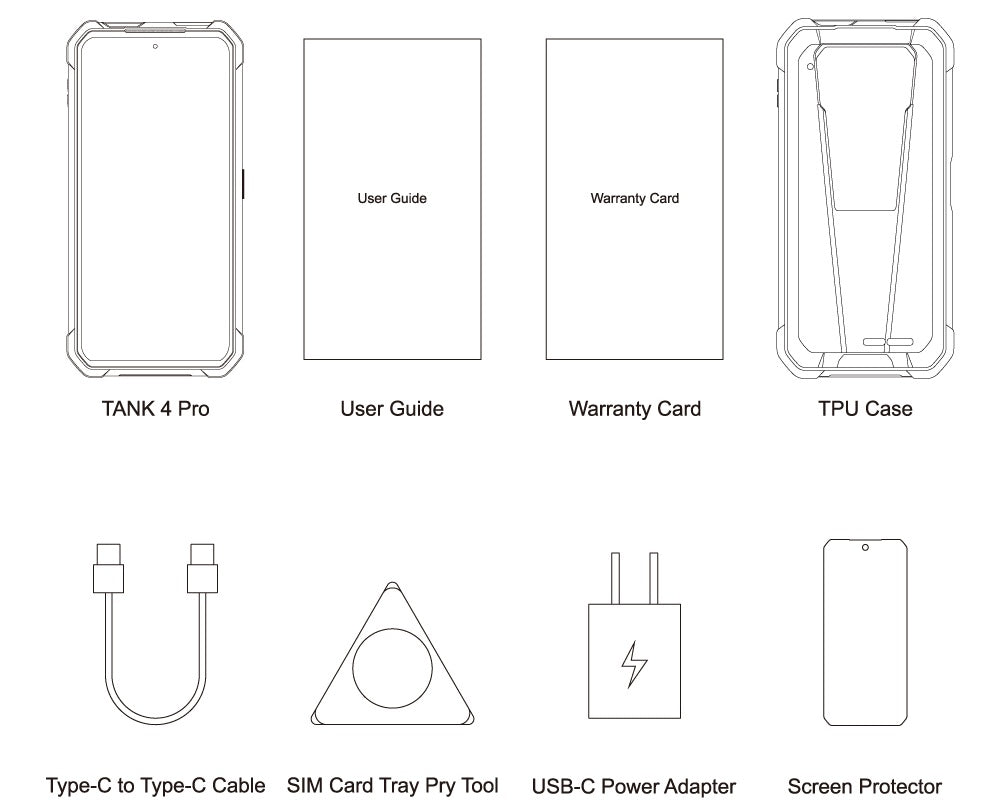
Dans la boîte
GENERAL QUESTIONS
1. Go to Settings ->System ->About Phone ->IMEI number 1 and 2.
2. Look for the IMEIs on the box of the phone (if you still have it).
Settings ->System ->About phone ->Wireless update
Please follow these steps to clear cache before searching for the update again:
Settings -> App Notifications ->See all apps ->Show System (top right corner with 3 dots) ->Wireless update-> Clear Data and Cache
Reset to Factory Settings (When your phone can be turned on)
Settings ->System ->Reset Options ->Erase all data (factory reset)
Reset to Factory Settings (When your phone cannot be turned on)
Power off your phone -> Press and hold the Power and Volume up buttons -> After your phone vibrates, keep holding the buttons for 5 seconds to enter Recovery mode -> Press the Volume up and down buttons to select the option to clear data or restore your device to its factory settings -> then press the Power button to confirm -> Reboot your phone.
If you have forgotten your phone password and want to unlock it, you will have to restore your device to its factory settings. Then you can set it up again and set a new screen lock.
However, all data on your phone will be erased and cannot be restored. It is recommended that you confirm whether you have backed up your phone data on the cloud or by other means. It is also recommended that you confirm whether you or someone else has changed the PIN/password. If you still cannot recall the password, refer to last Question to restore your device.
English, English(UK), German, French, Italian, Portuguese, Spanish, Russian, Dutch, Japanese, Simplified Chinese, Traditional Chinese(Zhuyin, Cangjie, Quick input).
For the keyboard input of other languages, we may consider adding them in the future if we receive enough demands.
On the other hand, Android system supports a wide range of languages, with which you will be able to turn on touch screen input as a supplement.
TELECOM COMPATIBILITY
1. Check the feedback from other users here.
2. Please find the the phone's supported bands in product specs and check if those meet your sim-card carrier's needs or contact your carrier.
* Due to different carrier's policy regarding to unlocked phones, LTE wireless service may not be available even if listed bands are supported by your carrier. When this happens, please contact your carrier for more details.
Our phone can work fine in Verizon network. However, as it is not certified by Verizon, you cannot activate your new SIM card with it. Please activate the new SIM card with another Verizon certified device and then use it in your Unihertz phone.
TECHNICAL ISSUES (PROBLEM SHOOTING)
Please follow the guide to do a micro-calibration for your phone (you can also contact us for a video guide):
1. Please clear the dust in your proximity censor hole on top of your phone.
2. Input *#3377# in the Dial-up interface.
3. Click Distance calibration.
4. Follow the guide to finish the process.
Please permit the apps to run in the background by activating them in the following three settings:
1. Settings ->DuraSpeed
2. Settings ->Intelligent assitance ->App blocker
3. Settings ->App¬ification ->See all apps ->this app ->Battery ->Battery optimization and Background restriction->Don't optimize
You can also watch a video guide here.
It is not advised to downgrade your smartphone since there might be compatibility issues.
Please contact your operator and check the APN parameters.
1. Go to Sound Recorder app and run a recording test.
2. Check whether your SIM card works well on the other phone.
1. Please check if this only happened to some or all of friends you called.
2. Stay in the same location and insert your SIM card into another Android phone and the same issue arises.
3. Turn on call record in the call interface to record a call, then check whether the sound recorded is normal.
1. Please send us a full screenshot of your battery usage in Settings ->battery ->battery usage.
2. Follow these steps to capture the battery log and send it to service@unihertz.com for further analysis.
REPAIR AND WARRANTY
For repair, please send without the accessories.
For replacement or refund, please send with accessories in one package.
The broken glass is not covered by warranty.
Please send the smartphone back to us after negotiating with service@unihertz.com as we do not provide phone screen separately. Repair or replacement fee may apply.
The repaired/ replaced device will get extra 90 days warranty or the remaining original warranty period, whichever is longer.