


Tank 4 Pro - AMOLEDディスプレイとDLPプロジェクターを搭載した5G対応の堅牢スマートフォン
認証済み



オプションを選択
認証済み
認証済み
精密さ、耐久性、スピード—Tank 4 Proがすべてを叶える

タフネス性能の王者
Tank 4 ProはMediaTek Dimensity 8300 5Gチップセット(4nmプロセス)を搭載し、効率とバッテリー寿命を最大化。オクタコアCPUと高性能GPUにより、ゲームもアプリ起動もマルチタスクもスムーズで、要求の高い作業にも対応します。

いつでもどこでもプロジェクション
Tank 4 Proは高速オートフォーカスと台形補正機能を備え、手軽に大画面で映像を楽しめます。最大120インチのシネマ級映像を投影可能。最大4.5時間の連続投影で、映画やプレゼン、外出先でのゲームにも最適です。

6.73インチAMOLEDディスプレイ&120Hzリフレッシュレート
Tank 4 Proは6.73インチのAMOLEDディスプレイ(3200×1440解像度)を搭載し、鮮やかな色彩とシャープなディテールで高精細なコンテンツを楽しめます。120Hzリフレッシュレートにより、スクロールやアニメーション、ゲームプレイも滑らかで快適な視聴体験を実現します。

あらゆる場面に対応する大容量ストレージ
Tank 4 Proは16GBのRAMと512GBのストレージを組み合わせ、写真、動画、映画、ファイルの保存やマルチタスクもスムーズ。さらにmicroSDスロット搭載で、ライブラリが増えてもいつでもストレージを拡張できます。

アップグレードされたカメラシステム
Tank 4 Proは、Samsung S5KGN1SP 1/1.3インチセンサーを採用した50MP AFメインカメラを中心に、64MPナイトビジョンカメラと50MP望遠レンズを備えたトリプルリアカメラシステムを搭載し、アウトドア環境で多彩な撮影が可能です。フロントには32MPセルフィーカメラを搭載し、クリアな自撮りが楽しめます。

11600mAh大容量バッテリー+66W急速充電
大容量11600mAhバッテリーを搭載したTank 4 Proは、ヘビーユーザーやアウトドア愛好家に最適です。66W急速充電により、素早く充電でき、ダウンタイムを最小限に抑えます。

※すべてのバッテリー性能は、携帯ネットワーク、場所、電波強度、機能設定、使用状況など多くの要因によって異なります。実際の結果は変動します。
アウトドア向け設計:タフでありながら持ち運びやすい
IP68およびIP69Kの防塵・防水性能を備えたTank 4 Proは、雨や砂、過酷な環境にも対応します。重さ530gで、頑丈な保護と日常の持ち運びやすさを両立しています。

スマホから大画面へ接続:視界を広げよう
Tank 4 Proを大きな画面に接続すれば、ゲーム、ストリーミング、学習、プレゼンテーションなどでより広い視界を楽しめます。安定した有線接続により、遅延の少ないスムーズな映像を実現します。

多機能ツールキット
Tank 4 Proは、アウトドアや産業用途に最適な実用的かつプロフェッショナルなツールを内蔵しています。仕事、探検、緊急時に対応するオールインワンソリューションを提供します。

Unihertz Tank 4 Pro 仕様
基本情報
Dimensions: 174.9 × 87 × 22.5 mmWeight: 530g (With Battery)
CPU: Dimensity 8300 (5G) オクタコア 2.2-3.2GHz
OS: Android 15
Memory: 16/18GB LPDDR5X + 512GB/1TB UFS 4.0
Battery: 取り外し不可 11600 mAh
Charge Rate: 120W
SIM Card Type: デュアル Nano SIM カード
Micro SD: はい
Card Slot: デュアル SIM + Micro SD
ディスプレイ
Material: AMOLEDDisplay Size: 6.73インチ (Refresh Rate: 120hz)
Resolution: 1440 × 3200 ピクセル
Camera
Rear Camera: 50MP メインカメラ + 64MP ナイトビジョンカメラ + 50MP 望遠カメラFront Camera: 32MP
Connectivity
Bands: 2G GSM: Bands 2/3/5/8, 3G WCDMA: Bands 1/2/4/5/6/8/19, 3G CDMA2000: Bands BC0/BC1, 4G FDD-LTE: Bands 1/2/3/4/5/7/8/12/13/17/18/19/20/25/26/28A/28B/66, 4G TDD-LTE: Bands 34/38/39/40/41/42/48, 5G NR: Bands N1/2/3/5/7/8/20/25/26/28/38/40/41/48/66/77/78, 5G NR (4×4 MIMO): Bands N1/3/38/41/48/77/78Wi-Fi: WLAN 802.11 a/b/g/n/ac/ax 2.4GHz/5GHz, 2×2 MIMO, Wi-Fi Direct, Wi-Fi ディスプレイ, Wi-Fi Hotspot , MU-MIMO
Bluetooth: Bluetooth 5.4
NFC: はい
Navigation: GPS + GLONASS + BEIDOU + Galileo
Features
Sensors: 指紋認証, G-Sensor, ジャイロスコープ, 近接センサー, 環境光センサー, コンパス, バロセンサーFingerprint: はい
Facial Recognition: はい
Infrared Port: はい
USB: USB Type C (USB 3.2 Gen1 + DP 1.4)
USB OTG: はい
Programmable Key: はい
Loudspeaker: はい
3.5mm Headphone Jack: はい
Wireless Charging: いいえ
FM Radio: はい
Misc
Color: ブラックSplash, Water & Dust Resistant: IP68 防水 / 防塵
Shock Resistant: はい
Camping Light: はい
Camping Light Brightness: 最大 1200 lm / 赤 | 青 警告灯
Projection: はい
SAR Value: SAR (EU 10g): Head 0.396 W/kg, Body 0.965 W/kg; SAR (US 1g): Head 0.769 W/kg, Body 1.025 W/kg
Certifications
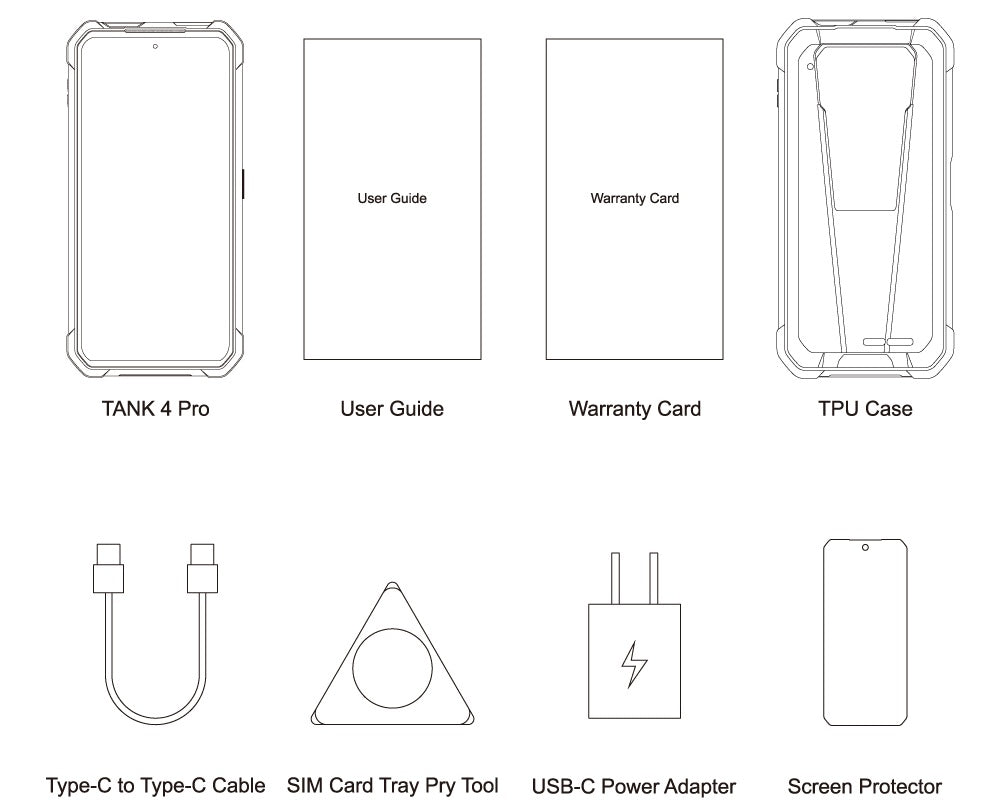
同梱物
GENERAL QUESTIONS
1. Go to Settings ->System ->About Phone ->IMEI number 1 and 2.
2. Look for the IMEIs on the box of the phone (if you still have it).
Settings ->System ->About phone ->Wireless update
Please follow these steps to clear cache before searching for the update again:
Settings -> App Notifications ->See all apps ->Show System (top right corner with 3 dots) ->Wireless update-> Clear Data and Cache
Reset to Factory Settings (When your phone can be turned on)
Settings ->System ->Reset Options ->Erase all data (factory reset)
Reset to Factory Settings (When your phone cannot be turned on)
Power off your phone -> Press and hold the Power and Volume up buttons -> After your phone vibrates, keep holding the buttons for 5 seconds to enter Recovery mode -> Press the Volume up and down buttons to select the option to clear data or restore your device to its factory settings -> then press the Power button to confirm -> Reboot your phone.
If you have forgotten your phone password and want to unlock it, you will have to restore your device to its factory settings. Then you can set it up again and set a new screen lock.
However, all data on your phone will be erased and cannot be restored. It is recommended that you confirm whether you have backed up your phone data on the cloud or by other means. It is also recommended that you confirm whether you or someone else has changed the PIN/password. If you still cannot recall the password, refer to last Question to restore your device.
English, English(UK), German, French, Italian, Portuguese, Spanish, Russian, Dutch, Japanese, Simplified Chinese, Traditional Chinese(Zhuyin, Cangjie, Quick input).
For the keyboard input of other languages, we may consider adding them in the future if we receive enough demands.
On the other hand, Android system supports a wide range of languages, with which you will be able to turn on touch screen input as a supplement.
TELECOM COMPATIBILITY
1. Check the feedback from other users here.
2. Please find the the phone's supported bands in product specs and check if those meet your sim-card carrier's needs or contact your carrier.
* Due to different carrier's policy regarding to unlocked phones, LTE wireless service may not be available even if listed bands are supported by your carrier. When this happens, please contact your carrier for more details.
Our phone can work fine in Verizon network. However, as it is not certified by Verizon, you cannot activate your new SIM card with it. Please activate the new SIM card with another Verizon certified device and then use it in your Unihertz phone.
TECHNICAL ISSUES (PROBLEM SHOOTING)
Please follow the guide to do a micro-calibration for your phone (you can also contact us for a video guide):
1. Please clear the dust in your proximity censor hole on top of your phone.
2. Input *#3377# in the Dial-up interface.
3. Click Distance calibration.
4. Follow the guide to finish the process.
Please permit the apps to run in the background by activating them in the following three settings:
1. Settings ->DuraSpeed
2. Settings ->Intelligent assitance ->App blocker
3. Settings ->App¬ification ->See all apps ->this app ->Battery ->Battery optimization and Background restriction->Don't optimize
You can also watch a video guide here.
It is not advised to downgrade your smartphone since there might be compatibility issues.
Please contact your operator and check the APN parameters.
1. Go to Sound Recorder app and run a recording test.
2. Check whether your SIM card works well on the other phone.
1. Please check if this only happened to some or all of friends you called.
2. Stay in the same location and insert your SIM card into another Android phone and the same issue arises.
3. Turn on call record in the call interface to record a call, then check whether the sound recorded is normal.
1. Please send us a full screenshot of your battery usage in Settings ->battery ->battery usage.
2. Follow these steps to capture the battery log and send it to service@unihertz.com for further analysis.
REPAIR AND WARRANTY
For repair, please send without the accessories.
For replacement or refund, please send with accessories in one package.
The broken glass is not covered by warranty.
Please send the smartphone back to us after negotiating with service@unihertz.com as we do not provide phone screen separately. Repair or replacement fee may apply.
The repaired/ replaced device will get extra 90 days warranty or the remaining original warranty period, whichever is longer.