


Tank 4 Pro - 5G Rugged Smartphone with AMOLED Display & DLP Projector
Certified by



Choose options
Certified by
Certified by
Precision, Durability, and Speed – Tank 4 Pro Delivers It All

The Rugged Performance King
Tank 4 Pro is powered by the MediaTek Dimensity 8300 5G chipset, built on a 4nm process to help maximize efficiency and battery life. With an octa-core CPU and a high-performance GPU, it delivers smooth gameplay, fast app launches, and responsive multitasking for demanding workflows.

Project Anytime, Anywhere
Tank 4 Pro features fast autofocus and keystone correction for effortless large-screen viewing. It projects cinema-quality images up to 120 inches. With up to 4.5 hours of continuous projection, it is ideal for movies, presentations, and gaming on the go.

6.73" AMOLED Display & 120Hz Refresh Rate
Tank 4 Pro boasts a 6.73-inch AMOLED display with a 3200 × 1440 resolution, delivering vibrant colors and sharp detail for high-definition content. With a 120Hz refresh rate, it keeps scrolling, animations, and gameplay smooth and responsive for a better overall viewing experience.

Massive Storage Ready for Anything
Tank 4 Pro pairs 16GB RAM with 512GB storage for smooth multitasking and plenty of space for photos, videos, movies, and files, plus a microSD slot so you can expand storage anytime as your library grows.

Upgraded Camera System
Tank 4 Pro features a triple rear camera system led by a 50MP AF main camera using the Samsung S5KGN1SP 1/1.3-inch sensor, plus a 64MP night vision camera and a 50MP telephoto lens for versatile shooting in outdoor environments. Up front, a 32MP selfie camera delivers clear selfies.

11600mAh Large Battery + 66W Fast Charging
Packing a massive 11600mAh battery, Tank 4 Pro is ideal for heavy users and outdoor enthusiasts. With 66W fast charging, you can recharge quickly and minimize downtime.

* All battery claims depend on the cellular network, location, signal strength, feature configuration, usage, and many other factors; actual results will vary.
Designed for the Outdoors: Tough Yet Portable
With IP68 and IP69K ratings for dust and water resistance, Tank 4 Pro is built to handle rain, sand, and harsh environments. With a weight of 530g, it strikes a balance between rugged protection and everyday portability.

Phone-to-Screen Connectivity: Expand Your View
HDMI output lets Tank 4 Pro connect directly to TVs and monitors to expand your view. Go big for gaming, streaming, and study, with a stable wired connection and minimal lag.

Multi-Use Toolkit
Tank 4 Pro comes with a built-in suite of practical and professional tools for outdoor and industrial use. It delivers an all-in-one solution for work, exploration, and emergencies.

Unihertz Tank 4 Pro Specifications
Basic Information
Dimensions: 174.9 × 87 × 22.5 mmWeight: 530g (With Battery)
CPU: Dimensity 8300 (5G) Octa-Core 2.2-3.2GHz
OS: Android 15
Memory: 16/18GB LPDDR5X + 512GB/1TB UFS 4.0
Battery: Non-Removable 11600 mAh
Charge Rate: 120W
SIM Card Type: Dual Nano SIM Card
Micro SD: Yes
Card Slot: Dual SIMs + Micro SD
Display
Material: AMOLEDDisplay Size: 6.73 inches (Refresh Rate: 120hz)
Resolution: 1440 × 3200 Pixels
Camera
Rear Camera: 50MP Main Camera + 64MP Night Vision Camera + 50MP TelephotoFront Camera: 32MP
Connectivity
Bands: 2G GSM: Bands 2/3/5/8, 3G WCDMA: Bands 1/2/4/5/6/8/19, 3G CDMA2000: Bands BC0/BC1, 4G FDD-LTE: Bands 1/2/3/4/5/7/8/12/13/17/18/19/20/25/26/28A/28B/66, 4G TDD-LTE: Bands 34/38/39/40/41/42/48, 5G NR: Bands N1/2/3/5/7/8/20/25/26/28/38/40/41/48/66/77/78, 5G NR (4×4 MIMO): Bands N1/3/38/41/48/77/78Wi-Fi: WLAN 802.11 a/b/g/n/ac/ax 2.4GHz/5GHz, 2×2 MIMO, Wi-Fi Direct, Wi-Fi Display, Wi-Fi Hotspot , MU-MIMO
Bluetooth: Bluetooth 5.4
NFC: Yes
Navigation: GPS + GLONASS + BEIDOU + Galileo
Features
Sensors: Fingerprint, G-Sensor, Gyroscope, Proximity, Ambient Light Sensor, Compass, BaroceptorFingerprint: Yes
Facial Recognition: Yes
Infrared Port: Yes
USB: USB Type C (USB 3.2 Gen1 + DP 1.4)
USB OTG: Yes
Programmable Key: Yes
Loudspeaker: Yes
3.5mm Headphone Jack: Yes
Wireless Charging: No
FM Radio: Yes
Misc
Color: BlackSplash, Water & Dust Resistant: IP68 Water / Dust Resistant
Shock Resistant: Yes
Camping Light: Yes
Camping Light Brightness: Max. 1200 lm / Red | Blue Warning Light
Projection: Yes
SAR Value: SAR (EU 10g): Head 0.396 W/kg, Body 0.965 W/kg; SAR (US 1g): Head 0.769 W/kg, Body 1.025 W/kg
Certifications
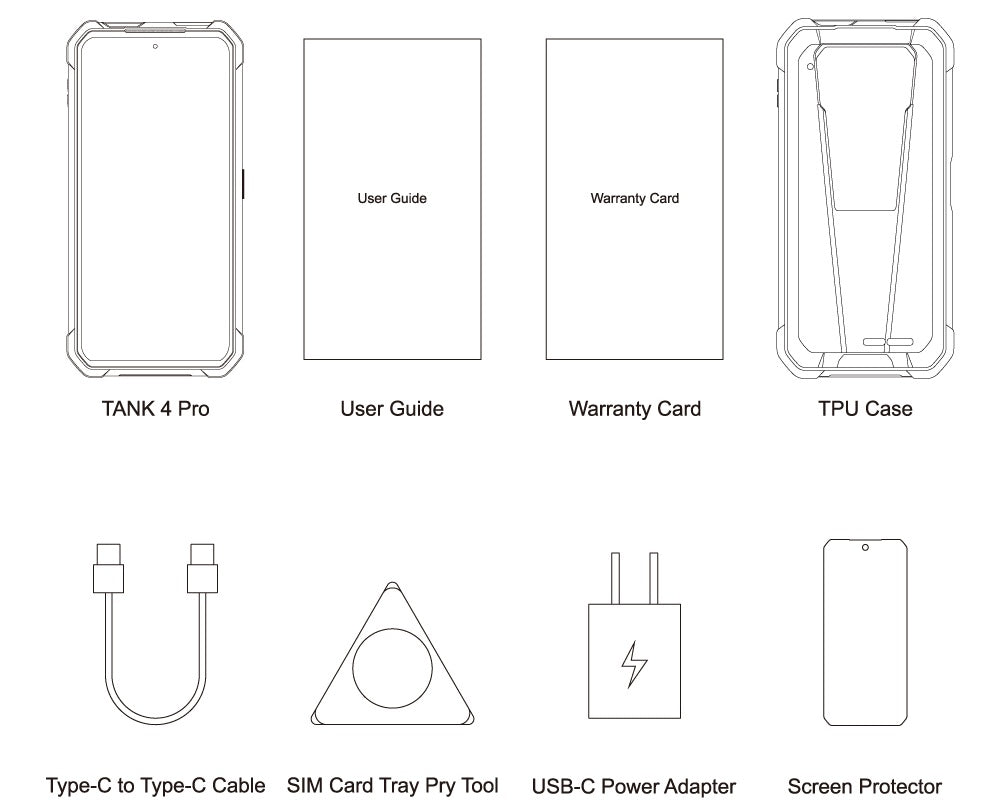
In the Box
GENERAL QUESTIONS
1. Go to Settings ->System ->About Phone ->IMEI number 1 and 2.
2. Look for the IMEIs on the box of the phone (if you still have it).
Settings ->System ->About phone ->Wireless update
Please follow these steps to clear cache before searching for the update again:
Settings -> App Notifications ->See all apps ->Show System (top right corner with 3 dots) ->Wireless update-> Clear Data and Cache
Reset to Factory Settings (When your phone can be turned on)
Settings ->System ->Reset Options ->Erase all data (factory reset)
Reset to Factory Settings (When your phone cannot be turned on)
Power off your phone -> Press and hold the Power and Volume up buttons -> After your phone vibrates, keep holding the buttons for 5 seconds to enter Recovery mode -> Press the Volume up and down buttons to select the option to clear data or restore your device to its factory settings -> then press the Power button to confirm -> Reboot your phone.
If you have forgotten your phone password and want to unlock it, you will have to restore your device to its factory settings. Then you can set it up again and set a new screen lock.
However, all data on your phone will be erased and cannot be restored. It is recommended that you confirm whether you have backed up your phone data on the cloud or by other means. It is also recommended that you confirm whether you or someone else has changed the PIN/password. If you still cannot recall the password, refer to last Question to restore your device.
English, English(UK), German, French, Italian, Portuguese, Spanish, Russian, Dutch, Japanese, Simplified Chinese, Traditional Chinese(Zhuyin, Cangjie, Quick input).
For the keyboard input of other languages, we may consider adding them in the future if we receive enough demands.
On the other hand, Android system supports a wide range of languages, with which you will be able to turn on touch screen input as a supplement.
TELECOM COMPATIBILITY
1. Check the feedback from other users here.
2. Please find the the phone's supported bands in product specs and check if those meet your sim-card carrier's needs or contact your carrier.
* Due to different carrier's policy regarding to unlocked phones, LTE wireless service may not be available even if listed bands are supported by your carrier. When this happens, please contact your carrier for more details.
Our phone can work fine in Verizon network. However, as it is not certified by Verizon, you cannot activate your new SIM card with it. Please activate the new SIM card with another Verizon certified device and then use it in your Unihertz phone.
TECHNICAL ISSUES (PROBLEM SHOOTING)
Please follow the guide to do a micro-calibration for your phone (you can also contact us for a video guide):
1. Please clear the dust in your proximity censor hole on top of your phone.
2. Input *#3377# in the Dial-up interface.
3. Click Distance calibration.
4. Follow the guide to finish the process.
Please permit the apps to run in the background by activating them in the following three settings:
1. Settings ->DuraSpeed
2. Settings ->Intelligent assitance ->App blocker
3. Settings ->App¬ification ->See all apps ->this app ->Battery ->Battery optimization and Background restriction->Don't optimize
You can also watch a video guide here.
It is not advised to downgrade your smartphone since there might be compatibility issues.
Please contact your operator and check the APN parameters.
1. Go to Sound Recorder app and run a recording test.
2. Check whether your SIM card works well on the other phone.
1. Please check if this only happened to some or all of friends you called.
2. Stay in the same location and insert your SIM card into another Android phone and the same issue arises.
3. Turn on call record in the call interface to record a call, then check whether the sound recorded is normal.
1. Please send us a full screenshot of your battery usage in Settings ->battery ->battery usage.
2. Follow these steps to capture the battery log and send it to service@unihertz.com for further analysis.
REPAIR AND WARRANTY
For repair, please send without the accessories.
For replacement or refund, please send with accessories in one package.
The broken glass is not covered by warranty.
Please send the smartphone back to us after negotiating with service@unihertz.com as we do not provide phone screen separately. Repair or replacement fee may apply.
The repaired/ replaced device will get extra 90 days warranty or the remaining original warranty period, whichever is longer.